

Authenticate with an API key
The Pristo API identifies your system by an API key that you send in the X-API-Key header of every request. You create the key in the Pristo CX app under Management > API keys, and it belongs to the program that is selected when you create it.
Before you start
Section titled “Before you start”- Role: you are an Account admin or a Program admin of the program. See roles and permissions.
- Plan: Standard or Pro. API keys doesn’t appear on the Free plan.
- Program: switch to the program the key is for by selecting the program name in the header, as in navigate the app. Events you send with the key go to this program’s population. See the glossary.
-
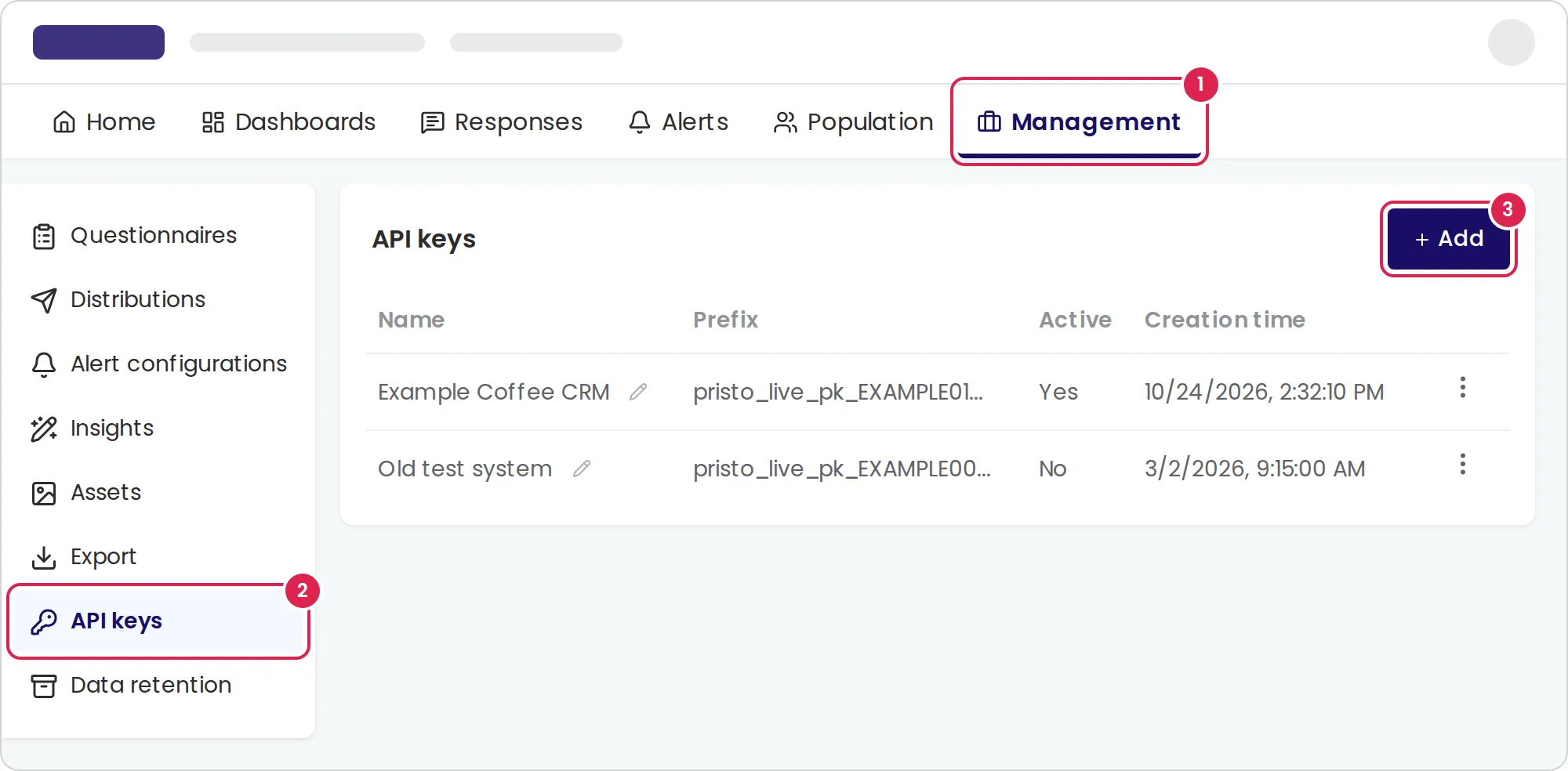
Select Management in the main menu.
-
Select API keys.
-
Select Add.
-
Enter a name in Name that says which system uses the key, for example
Example Coffee CRM. -
Select Create.
-
Select Copy code and store the key in your system’s secret store.
-
Close the dialog.
Result
Section titled “Result”The key appears in the list with its Name, the first 24 characters in Prefix, Active set to Yes, and its Creation time. A key looks like pristo_live_pk_ followed by 32 letters and digits.
Send the key with every request:
curl -X POST "https://api.pristo.io/v1/events/send" \ -H "X-API-Key: $PRISTO_API_KEY" \ -H "Content-Type: application/json" \ -d '{"type": "purchase", "contact": {"id": "CUST-1042", "email": "dana@example.com"}}'Manage keys
Section titled “Manage keys”Open the menu at the end of a key’s row:
- Deactivate stops the key. The next request that uses it gets
401 Unauthorized. - Activate turns an inactive key back on. An activated key counts toward the 10 active keys, and the account must be on the Standard or Pro plan.
- Delete appears only for an inactive key and removes it from the list for good.
To rename a key, select the pencil next to its name. To rotate a key, create a new one, switch your system to it, then deactivate and delete the old one.
Limits
Section titled “Limits”- Up to 10 active API keys per account, counted across all programs. Inactive keys don’t count.
- A key name has 1 to 50 characters.
- The list shows only the keys of the selected program.
Troubleshooting
Section titled “Troubleshooting”I can’t find where to create a key. If Management is missing from the main menu, you are a Program user in this program: ask an account admin or a program admin. If Management has no API keys, the account is on the Free plan.
Every request returns 401. The X-API-Key header is missing, the key is wrong, or the key was deactivated or deleted. Check the key’s Active value in the list and the header name.
A request returns 400 with Value is invalid. The header value is shorter than 24 characters. Copy the whole key again. See API errors.
I can’t create or activate a key. The account already has 10 active keys, or it is on the Free plan, which has no API access. Use Deactivate on a key you no longer need, or ask an account admin to upgrade the plan.