

Set how long data is kept
In the Pristo CX app, open Management > Data retention to save retention periods or delete a program’s collected content. Retention periods can be saved, but automatic deletion or anonymization when those periods end is not available yet. Manual deletion of program content is available to account admins.
Before you start
Section titled “Before you start”- Role: account admin or program admin for retention settings; account admin only for deleting program content. See Roles and permissions.
- Plan: every plan.
- Setup: select the correct program in the header. Stop sending distributions before deleting its content.
Save retention periods
Section titled “Save retention periods”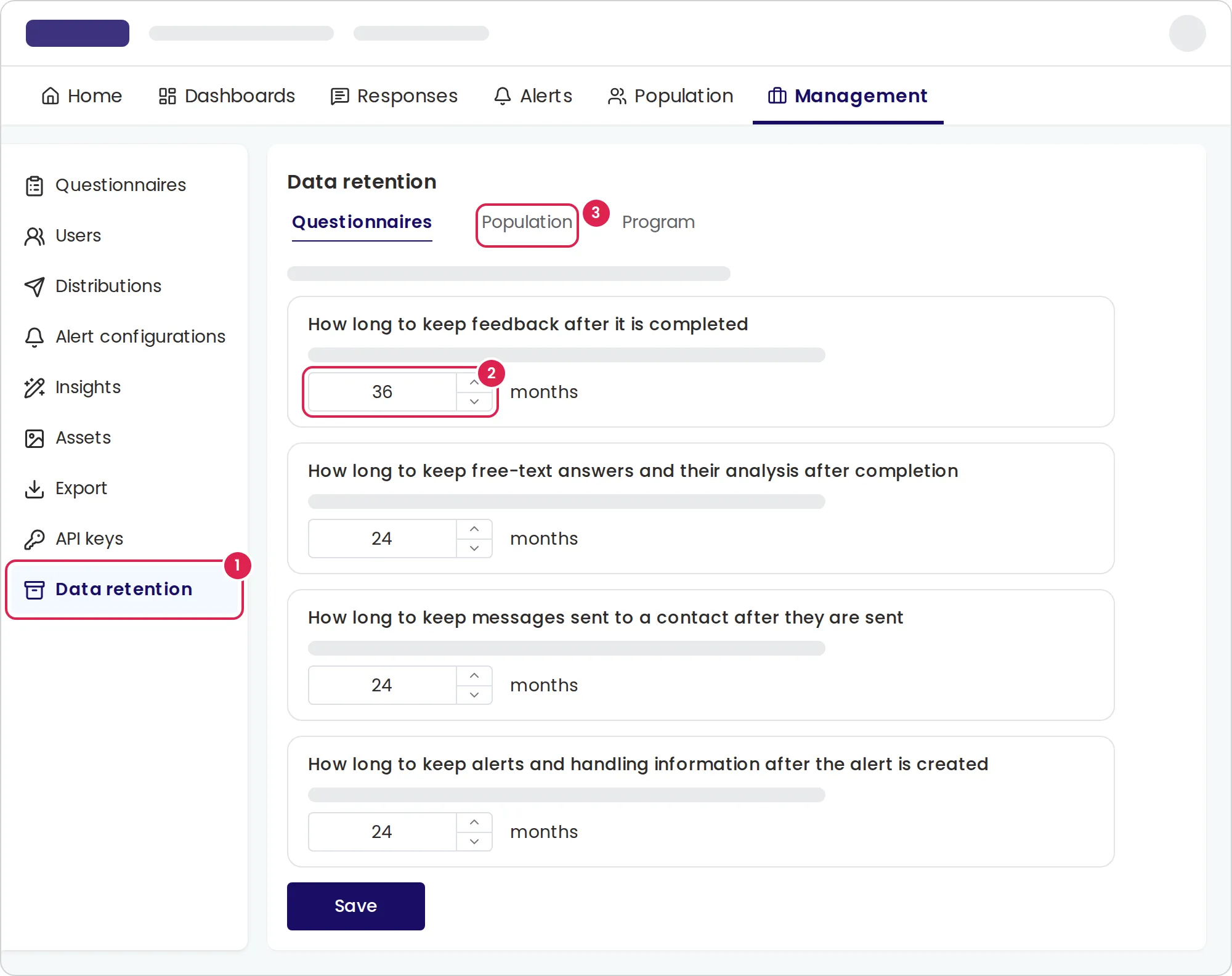
-
Open Management > Data retention.
-
On Questionnaires, enter whole months from 1 to 120 and select Save. The periods cover responses, free-text answers and analysis, sent messages, and alerts.
-
On Population, set the periods for contact details, attributes and unsubscribed contacts, then select Save.
-
If you shortened a period, select Continue in the confirmation.
Response retention defaults to 36 months; the other settings default to 24 months. Questionnaire periods apply to questionnaires that exist when you save. Save again after adding a questionnaire if it should use the same periods. Do not rely on these saved periods to erase data automatically in this release.
Delete all collected content of a program
Section titled “Delete all collected content of a program”-
On the same page, select Program.
-
Select Delete program content and read the confirmation carefully.
-
Type the program’s name exactly, then select Delete all content.
-
Keep the page open until deletion finishes. A large program can take a moment.
Result
Section titled “Result”The page confirms deletion and shows the date of permanent erasure. Responses with their answers, files, analyses and alerts, contacts with their events and import history, sent messages, personal survey links and exports are removed from normal lists. Waiting messages are cancelled, and existing API survey links stop working.
Questionnaires, distributions, dashboards, alert rules, program members and settings are kept. Distributions remain active and can send to contacts imported afterward. Unsubscribes are kept, so deleting or re-importing contacts does not restore consent.
Limits
Section titled “Limits”- Deleted responses still count toward the plan’s per-questionnaire response limit. Response numbers continue; deletion does not reset the limit or reopen a full questionnaire.
- Dashboards, the Distributions Report and exports may still show deleted content for a few hours. Do not delete program content while a distribution is sending.
- There is no restore-all action. Single responses and contacts can be restored only while restoration is available. Cancelled messages are not sent again, and deleted exports and links are not restored that way.
- After permanent erasure, deleted content cannot be recovered.
Troubleshooting
Section titled “Troubleshooting”The program tab is missing. Only account admins can delete program content.
The delete button is disabled. The typed name must match the selected program’s name.
Deletion did not finish. Try again to continue the deletion.
The population tab has no settings. The program has no population.